If you have a storefront, the most valuable ad spot on Google might not be the top of the search results. It might be that little "Sponsored" pin in the map pack. That's what Google Maps ads are. People searching on Maps already want to go somewhere. You just want that somewhere to be you.
The catch is that Google won't sell you Maps on its own. This guide walks through how to set up a Performance Max campaign so most of its budget ends up on Maps and the map pack, which settings actually matter, and which popular tips don't hold up.
The short version
- You can't buy Maps-only ads. You can set up Performance Max so most of its budget lands on Maps (section 1).
- No verified Business Profile with a public address, no map ads. Link it to Google Ads and turn on location assets (section 2).
- Use the Local store visits and promotions objective and count only offline actions: store visits, directions and calls (sections 3 and 4).
- Conversion values only steer bidding on Maximize conversion value. On Maximize conversions, remove any goal you don't want counted (sections 5 and 6).
- Keep images and video to the minimum Google requires so there's less for YouTube and Display to use (section 7).
- Check where the money goes in the Channel performance report, and test store visits against real sales (sections 9 and 10).
Who This Guide Is For: Businesses Where Customers Come to You
1. You Can't Advertise Only on Google Maps, but You Can Tilt Performance Max Toward It
Google says it plainly in its own help docs: "you can't serve ads exclusively in Google Maps" (Google). A Performance Max campaign with a store goal can show on Maps, Search, YouTube, Display, Gmail, Business Profiles and Waze.
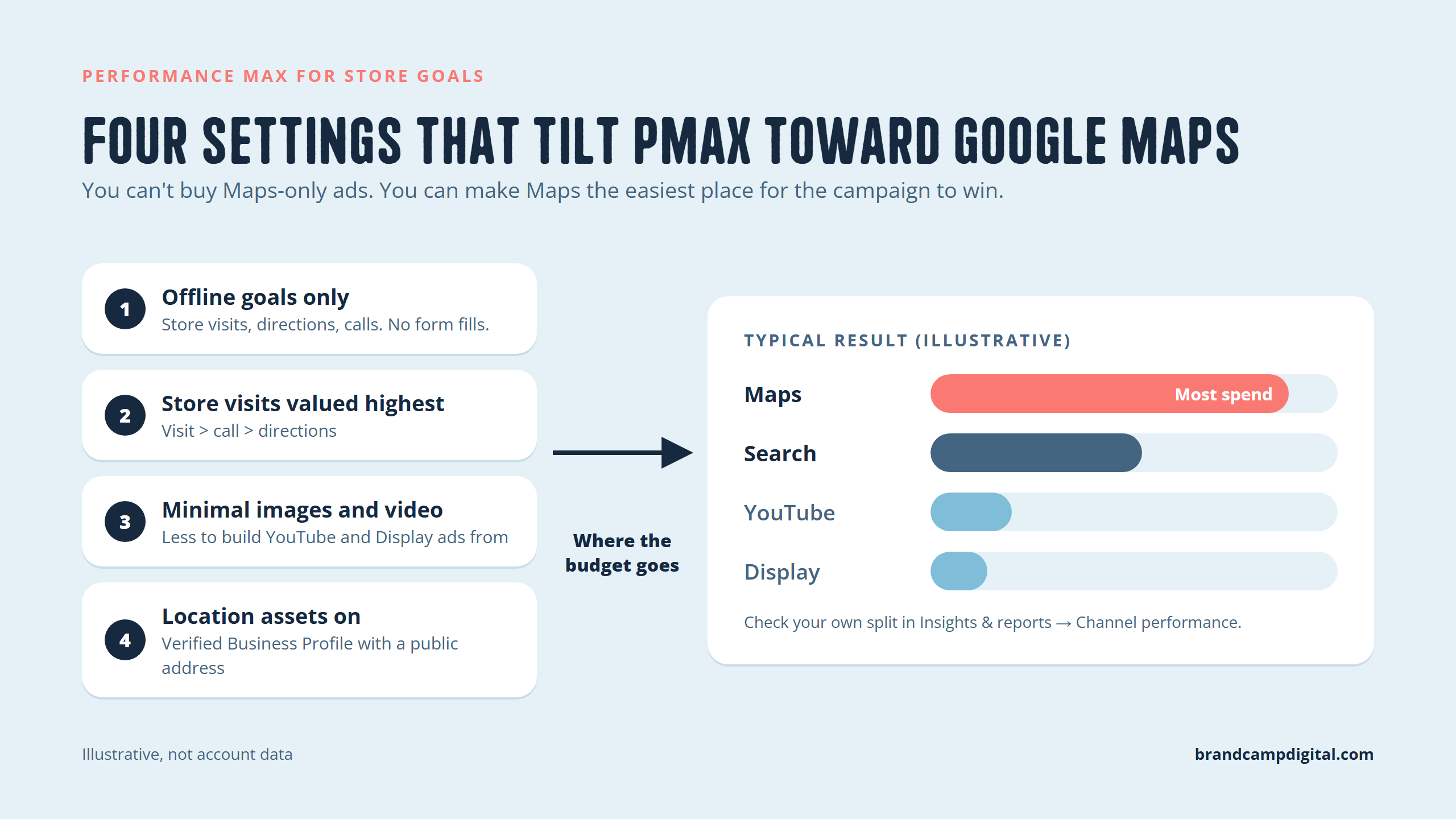
What you can do is control the signals Performance Max optimizes toward. When the only thing a campaign gets credit for is someone physically showing up, and you give it few assets for YouTube and Display, it tends to drift toward Maps. That's where those visits come from.
On Maps, your ad can show up as:
- Promoted pins: your logo on the map itself
- Map search ads: a sponsored result at the top of a Maps search
- Map suggest ads: your business in the autocomplete list before someone finishes typing
- Placesheet ads: your business shown on other places' listings

Every setting below pushes in the same direction: reward visits, make Maps the easiest place to win them.
2. Your Google Business Profile Powers Your Maps Ads: No Verified Address, No Map Ads
Maps ads come from your location assets, and location assets come from your Google Business Profile. Google's channel report spells it out: the Maps channel "requires a location asset to show ads" (Google). Before you touch a campaign:
- Verify your Business Profile and make sure the address, hours, category and photos are accurate. Your ad on Maps is basically your profile with a "Sponsored" label on it, so a messy profile means a messy ad.
- Link the profile to Google Ads. In Google Ads, go to Tools, then Data manager (or Linked accounts), then Google Business Profile.
- Turn on location assets at the account or campaign level, and check they're approved under Assets, then Locations.
- Opt the campaign in to location assets. Google says that if you don't, "store visits won't be reported" (Google).
The most common "why isn't my ad showing on Maps?" problem on Reddit is a location asset with a green dot and zero impressions. Usually the profile is set up as a service-area business with the address hidden. Google's docs don't promise map pins for profiles without a public address, and practitioners consistently report they don't get them.
3. Start With the "Local Store Visits and Promotions" Objective, Not Sales or Leads
The objective you pick when you create the campaign decides which goals Performance Max optimizes for. Choose Local store visits and promotions, then Performance Max as the campaign type (Google). This used to be its own "Local campaign" type, and Google folded it into PMax in 2022.
Next, you choose the stores to promote under Campaign feeds: all your Business Profile locations, or a subset through location groups.
Two honest caveats before you get excited:
- Store visits isn't available to everyone. Your account needs enough ad activity and foot traffic to clear Google's privacy thresholds, and Google doesn't publish a number. It recommends at least 10 locations for store-visit campaigns and 5 for local-action campaigns (Google).
- Single-location businesses can still do this. You'll most likely bid on local actions (directions and calls) instead of store visits. It still works, it's just a noisier signal. More on that below.
4. Only Give the Campaign Credit for Offline Actions
This is the most important setting in the whole guide. Performance Max goes wherever its conversions are cheapest. If website form fills or page views count as conversions, it will happily spend your budget on Display and YouTube traffic that fills forms and never comes in.
So strip the campaign's goals down to what happens off your website:
- Store visits (if your account is eligible). Once you're eligible, Google won't let you remove it from this objective anyway.
- Directions (Get directions clicks)
- Calls (Google-hosted contact actions), if phone calls matter to you
Then remove everything else at the campaign level. Leave your account-wide goals alone so your other campaigns aren't affected. One more rule from Google: pick store visits or store sales as an offline goal, never both (Google).
5. Give Store Visits More Value Than Directions, but Know When Values Actually Do Anything
A popular tip is to give directions little or no value and store visits a high one, so Google chases people who actually show up. The logic is good. A directions click is someone who might come in. A store visit is someone who did.
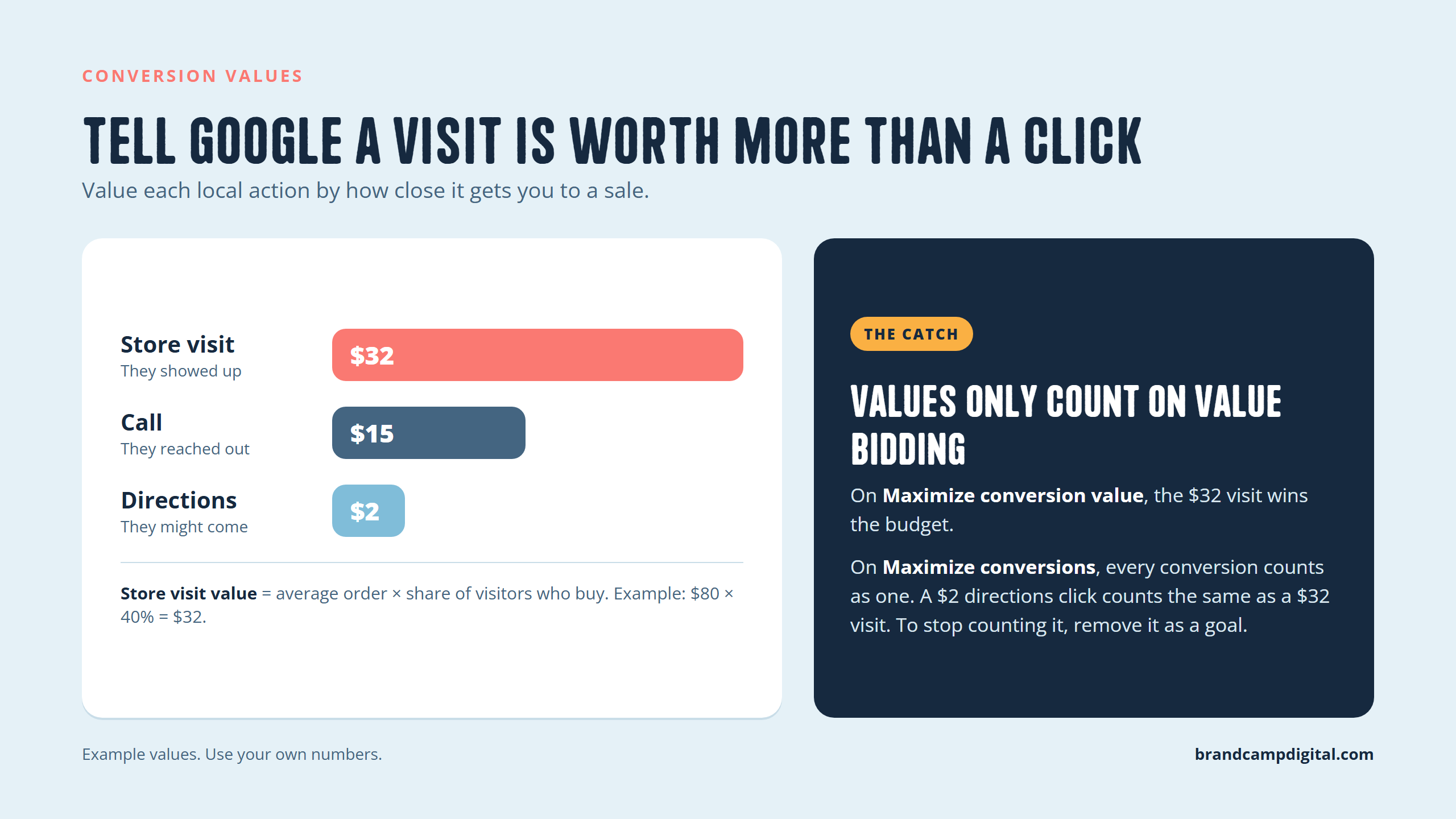
Google supports this. You can set a value for each goal, like "store visits = $25 USD and calls = $10 USD" (Google). A reasonable way to pick numbers:
- Store visit value = average order value × the share of visitors who buy. Example: $80 average order × 40% who buy = $32.
- Directions value = a small fraction of that, or close to $0 if store visits are tracking well.
- Call value = what a call is worth to you. For a restaurant taking bookings, that could be more than a visit.
The catch most people miss: values only change bidding when you use a value-based strategy (Maximize conversion value, optionally with a target ROAS). On Maximize conversions, every conversion counts as one, so a $0 directions click counts exactly like a $32 store visit. If you're on Maximize conversions and don't want directions to count, remove it as a goal.
One side effect to know: Waze ads only run when you bid on store visits, store sales or directions (Google). Drop directions and you may lose some Waze inventory. For most businesses that's fine.
6. Launch on Maximize Conversions, Then Switch to Conversion Value Once You Have Data
Maximize conversions is the safer starting point. It's simple, it needs no history, and it gets the campaign learning. Two rules while you're on it:
- Only include the goals you truly want (see section 4). Remember, values don't steer this strategy.
- Skip the target CPA at first. A tight target on a new campaign mostly just limits delivery. Add one later if cost per visit runs high.
Once the campaign is steadily recording conversions, about 30 a month is a common practitioner rule of thumb, switch to Maximize conversion value. Now your $32 store visit vs. $2 directions values actually start shaping where the money goes.
Give it time. Google recommends running at least 30 days and waiting "1-2 complete conversion cycles" before judging results (Google). Store visits also report with a delay, so the first two weeks always look worse than they really are.
7. Go Light on Images and Video So There's Less for YouTube and Display to Use
You'll see advice to "run PMax with no image assets" so it can only show text and map ads. The idea makes sense: Performance Max builds YouTube and Display ads out of your images and video, so fewer visuals means fewer places it can easily spend.
The reality in 2026: Google's current specs require at least one landscape (1.91:1) and one square (1:1) marketing image, plus a logo, for standard asset groups (Google Ads API docs). The truly image-free setups people describe mostly date back to the old Local campaigns, or to accounts set up before the current rules. So in practice it's "minimal visuals," not "no visuals":
- Upload only the minimum images. Use one clean storefront or interior shot in each required size. Your Business Profile photos still show on Maps either way.
- Use a strong logo. On Maps, your logo is your ad (it's the promoted pin).
- Write strong text. Use all 15 headlines and 5 descriptions, and lead with what matters to someone nearby: hours, "5 min from [neighbourhood]," parking, walk-ins welcome.
- Turn off Automatically created assets in campaign settings so Google doesn't generate extra text and pull in other pages.
- Know the video trade-off. With no video, Google may auto-generate one from your images (Google), and there's no separate switch to stop it. Either accept it, or upload one short, plain video so at least you control what runs.
To be clear about the evidence: Google doesn't say fewer visuals means more Maps delivery. It's a practitioner observation, and it fits how PMax picks placements. Check it against your own channel report (section 9) instead of taking it on faith.
8. Let Your Locations Set the Radius, Then Plug Leaks With Exclusions
This is where Google and practitioners disagree. Google says that when location assets are applied, "it is not recommended to apply geographic targets, including radius targets." It works out the area from your store locations, travel distances, population density and nearby competitors (Google). Many advertisers still set a tight 10 to 20 mile radius by hand to stop spend drifting.
What we'd do:
- Launch with Google's inferred targeting and location setting "Presence: people in or regularly in your locations."
- After two weeks, check the Locations report. If clicks are coming from places nobody would drive from, add location exclusions for those areas first. That keeps Google's model intact.
- Only switch to a manual radius if exclusions don't fix it.
Two other structure tips:
- Separate campaigns for locations that behave differently, like a downtown store and a suburban one. Then budget and radius don't get averaged across both.
- Add brand exclusions. Otherwise PMax can take credit for people already searching your name on Maps, who would have come anyway. Keep a separate brand campaign if you want that coverage.
9. Use the Channel Performance Report to Confirm the Money Is Going to Maps
You don't have to guess anymore. Since 2025, Performance Max has a channel report that breaks out Maps (which includes Waze) as its own row, next to Search, YouTube, Display, Gmail and Discover (Google).
Where to find it: Campaigns, then Insights and reports, then Channel performance. Then:
- Check Maps' share of cost and conversions. If YouTube and Display are eating most of the budget with few visits to show for it, go back to sections 4 and 7.
- Check the location asset stats under Assets, then Locations. Impressions and clicks there show your listing is actually serving.
- Don't Google yourself to check. You often won't see your own ad, and searching over and over without clicking can teach Google not to show it to you. Use the Ad Preview tool instead.
10. Store Visits Are Modeled Estimates, So Prove Them With a Holdout Test
This is the part most guides skip. Store visits aren't counted at your door. Google estimates them from signed-in users' location data and scales them up. That's useful, but it's also Google grading its own homework.
The skepticism is fair. Picture someone already driving to your store who sees your sponsored pin on the way. The campaign can take credit for that visit. Advertisers on r/PPC have raised exactly this (thread). Others in the same thread report strong results backed by holdout tests, including one 50+ location retailer seeing roughly 50% lower cost per action than Search. Both can be true.
How to check it yourself:
- Track a number Google doesn't control: POS transactions, foot-traffic counter, bookings, or "how did you hear about us."
- Run a geo holdout. Pause the campaign for 3 to 4 weeks in some locations or areas while it keeps running in similar ones.
- Compare real sales, not Google's store visits. If paused locations barely drop, a lot of those "visits" were going to happen anyway.
A single location can't split itself in two, so do an on/off test instead: 4 weeks on, 2 to 4 weeks off, and compare against the same period last year. It's rougher, but far better than trusting the dashboard.
11. PMax Isn't Always the Answer: Search With Location Assets Often Wins for Small Budgets
Performance Max is one of three ways into the map pack. Pick by business type and budget:
| Option | Best for | How you pay | Control | Map placements |
|---|---|---|---|---|
| PMax with a store goal | Storefronts, especially multi-location | CPC on clicks, CPM on logo pins | Low (no channel opt-outs) | Most Maps formats, including promoted pins and map suggest |
| Search + location assets | Single locations, tight budgets | CPC | High (your keywords, Search only) | Sponsored map pack results on local searches |
| Local Services Ads | Eligible service trades (plumbers, lawyers, cleaners) | Per lead | Medium | Separate "Google Guaranteed/Screened" placement |
Our honest take:
- One location and under about $1,500 a month? Start with a well-built Search campaign with location assets and local-intent keywords ("[service] near me," "[service] in [city]"). You get map pack eligibility without paying for YouTube and Display.
- Several storefronts, or you already have Search covered? Add PMax with a store goal on top. Practitioners regularly report it gets far more Maps impressions than Search alone.
- Service-area business with no public address? Map pin ads are mostly off the table. Look at Local Services Ads and Search.
12. How Much Do Google Maps Ads Cost?
There's no set price. Google Maps ads are paid per click (or per view for logo pins) in an auction. According to Google (source):
- You pay per click for directions, calls, website visits, clicks on your map pin, and headline or sitelink clicks. You're only charged for one of these per person, even if they click several.
- PMax store goals can charge per thousand impressions (CPM) when people see your branded logo pin on Maps.
- Swiping through your photos is free. So are media clicks that don't open your site or Business Profile.
What you'll actually pay depends on your category and city. One Reddit advertiser running PMax for a beauty supply store reported store visits at around $2 to $3 each (thread). Treat that as one data point, not a benchmark.
13. Troubleshooting: Why Your Ads Aren't Showing on Maps
| Symptom | Likely cause | Fix |
|---|---|---|
| Location asset approved, zero impressions | Profile hides its address (service-area business) | Show a real address, or use Search/LSA |
| Campaign shows almost nothing on Maps | Online conversions included as goals | Remove them at the campaign level (section 4) |
| Most spend on YouTube/Display | Plenty of visuals, no clear offline goal | Cut to minimum visuals, check goals |
| Store visits not available as a goal | Account below Google's eligibility thresholds | Bid on directions and calls instead |
| Clicks from far away | Inferred radius too wide | Add location exclusions, then a manual radius |
| Can't see your own ad | Google personalizes results | Use the Ad Preview tool |
Quick Setup Checklist
- Business Profile verified, with a public address
- Profile linked to Google Ads, location assets approved
- Objective: Local store visits and promotions, then Performance Max
- Goals: store visits (or directions and calls) only, online goals removed at campaign level
- Values: store visit > call > directions
- Bidding: Maximize conversions to start, conversion value after about 30 conversions a month
- Minimum images, strong logo, all 15 headlines, auto-created assets off
- Brand exclusions on
- After 2 weeks: Channel performance report and Locations report checked
- After 30+ days: holdout or on/off test against real sales
If you'd like a second set of eyes on your local campaigns, or help setting one up from scratch, reach out to the Brandcamp Digital team. We run Google Ads for storefronts across Canada and North America, and we're happy to look at your account and tell you honestly whether PMax, Search or both makes sense.
Sources
- About Performance Max for store goals: Google Ads Help
- Create a Performance Max campaign with a store goal: Google Ads Help
- Optimization tips for Performance Max for store goals: Google Ads Help
- Channel performance reporting: Google Ads Help
- How you are charged for Local Ads: Google Ads Help
- Performance Max asset requirements: Google Ads API docs
- About store visit conversions: Google Ads Help
- Auto-generated video in Performance Max: Google Ads Help
- Practitioner threads on r/PPC: PMax vs Search for store visits, PMax store visits for a new store, Limiting PMax to Maps


.png)